Column: A Font Designed for Clarity and Creativity
The world of typography is vast, with countless fonts available to suit every need—from formal reports to eye-catching posters. Among the many options, Column stands out as a versatile typeface that balances aesthetics with functionality. Whether you're crafting digital content, designing print materials, or experimenting with creative projects, Column offers a clean and modern appearance without sacrificing readability. This makes it an excellent choice for professionals who demand both visual appeal and practicality in their typographic selections.
Understanding the Design of Column
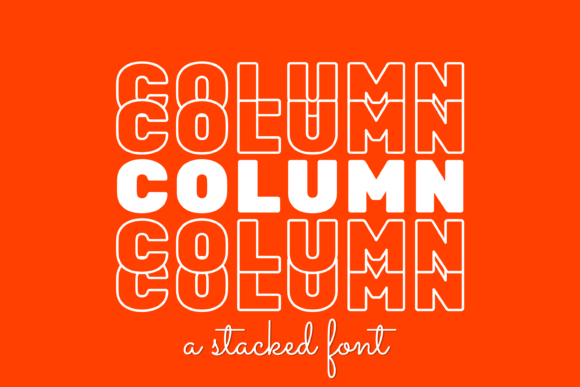
At first glance, Column appears deceptively simple. Its geometric structure and even weight distribution give it a structured yet approachable feel. The font features a neutral baseline, making it well-suited for long-form reading, while its subtle character variations—such as slightly flared serifs and open apertures—add a layer of sophistication. These design elements contribute to its legibility across different mediums and screen sizes, which is essential in today's multi-platform environment.
Column is particularly effective in professional settings where clarity is key. For instance, in editorial design or data visualization, this font can enhance the user experience by ensuring text remains easy to scan and digest. Its consistent spacing also helps maintain a sense of rhythm when used in body copy, reducing reader fatigue over extended passages.
Who Can Benefit from Using Column?
Several professions and industries can benefit from incorporating Column into their design toolkit:
- Designers and developers working on websites, mobile apps, or digital interfaces may appreciate its adaptability to varying screen resolutions and responsive layouts.
- Marketers and entrepreneurs seeking a polished look for branding materials, brochures, or presentations will find Column’s balanced proportions ideal for creating a cohesive visual identity.
- Freelancers and bloggers often use this font for blog headers or infographics because it blends seamlessly with both minimalist and more elaborate design schemes.
- Educators and publishers might choose Column for textbooks or e-learning platforms due to its strong emphasis on readability and accessibility.
Real-World Applications of Column
Consider a scenario where a small business owner is designing a new website for their boutique. They want something that feels modern but not overly trendy. Column would be a great fit here—it conveys professionalism without appearing cold or rigid. Similarly, a graphic designer working on a corporate newsletter could use Column for subheadings and pull quotes to add visual interest without overwhelming the layout.
In another example, a marketing team preparing a product launch presentation might utilize Column to highlight key statistics or taglines. Its uniform stroke width and clear letterforms make it suitable for bold statements while still maintaining a sense of elegance. This balance between form and function is what makes Column such a compelling option in a variety of contexts.
Strengths and Limitations of Column
One of Column’s greatest strengths lies in its neutrality. It doesn’t carry the heavy personality of more stylized fonts, which means it works well in both serious and casual environments. This makes it especially useful for brands aiming to project a reliable, trustworthy image. Additionally, the font supports multiple languages and includes ligatures and alternate glyphs that add depth without complicating the overall design.
However, like all fonts, Column has limitations. While it excels at body text and headlines, it may not be the best choice for highly decorative or artistic projects. Users looking for a dramatic impact through typography might find Column too understated. That said, for most business and editorial applications, this is less of a drawback and more of a feature, ensuring the focus remains on the message rather than the style.
Usability and Technical Considerations
When evaluating a font for use, usability is just as important as aesthetics. Column performs well in terms of cross-platform compatibility and rendering consistency. It displays reliably on Windows, macOS, iOS, and Android devices, which is crucial for designers targeting broad audiences. Moreover, its OpenType features allow for enhanced customization, including stylistic alternates and case-sensitive punctuation, giving users more control over their typographic output.
From a technical standpoint, the font file size is reasonable, which is beneficial for web developers concerned about page load times. When implemented correctly, Column won’t hinder performance, and it can be easily integrated into CSS-based designs using standard font-weight classes. This level of flexibility ensures it can adapt to various design frameworks without requiring extensive tweaks or workarounds.
Comparing Column to Other Fonts
While there are many sans-serif and serif fonts on the market, Column holds its own by offering a unique blend of simplicity and subtlety. Compared to Helvetica Neue or Arial, Column provides a more refined edge with its slightly tailored characters. In contrast to Lato or Roboto, it maintains a quieter presence, avoiding the trendiness that can date quickly in some design spaces.
For those familiar with DIN Pro or Futura, Column shares similar geometric qualities but introduces softer transitions and a more humanist touch. This makes it feel less mechanical and more inviting, especially when used in long paragraphs or dense text blocks. As a result, it serves as a middle ground between classic and contemporary typefaces, appealing to users who value both heritage and innovation.
Best Practices for Using Column
To get the most out of Column, consider the following guidelines:
- Use appropriate weights: Column comes in several weights (light, regular, medium, bold), allowing you to create visual hierarchy effectively. Match the weight to the context—for example, bold for headlines and regular for body text.
- Prioritize line spacing and font size: Because Column is a clean and structured font, generous leading and proper sizing can enhance its readability further. Avoid cramming too much text together, especially in smaller formats.
- Pair carefully: Column works well with other neutral or slightly contrasting fonts. Pairing it with a script or cursive typeface can add warmth and personality to otherwise sterile compositions.
- Test across devices: Always preview your design on different screens to ensure Column renders consistently. While it generally does well, slight adjustments in tracking or kerning may be necessary depending on the platform.
Long-Term Value and Reliability
Typography trends evolve rapidly, but Column demonstrates a timeless quality that ensures it remains relevant across years and design cycles. Its restrained design avoids the pitfalls of overused or outdated styles, making it a safe bet for clients and businesses that prioritize longevity in their branding efforts.
Additionally, the reliability of Column is backed by its widespread availability and licensing options. Whether you’re purchasing a commercial license or using a free version, you can expect consistent support and updates from the foundry. This gives users peace of mind knowing they can rely on the font for both current and future projects without worrying about sudden changes or obsolescence.
Where to Get and How to Use Column
Column is typically available through major font foundries and online marketplaces. Some platforms offer limited free versions, while others require a subscription or one-time purchase for full access. Before committing to a license, review the usage rights to ensure compliance with your specific needs, whether personal or commercial.
Once acquired, integrating Column into your workflow is straightforward. Most design software—including Adobe Creative Suite, Figma, Sketch, and Canva—supports custom font installation. For web use, include it via @font-face in your CSS or embed it using Google Fonts if available. This ease of implementation adds to its appeal, particularly for users managing complex projects or tight deadlines.
Final Thoughts
Fonts play a crucial role in shaping how audiences perceive content and brands. Choosing the right one requires balancing style, function, and audience expectations. Column meets these criteria with its clean lines, consistent spacing, and adaptable character set. It’s not flashy, but it gets the job done—making it a dependable choice for anyone who values clarity and efficiency in their typographic decisions.
If you’re working on a project where the message matters more than the ornamentation, Column is worth considering. It’s a font that speaks softly but clearly, helping you communicate effectively without drawing attention away from the core content. So before selecting another typeface, ask yourself: do I need something that’s visually striking, or something that simply works? In many cases, the answer leans toward the latter—and that’s where Column shines.