Integrating Black Dot Into Your Design Workflow for Maximum Impact
When to Use Black Dot in Your Creative Process
Knowing when to use Black Dot is just as important as knowing what it is. This font shines in specific moments of your creative workflow:
- Before a Project Starts: When brainstorming ideas for branding, marketing materials, or editorial layouts, consider how a bold headline could set the tone. Black Dot can help you visualize the mood of the final piece early on.
- During the Design Phase: If your project requires a standout title or a call-to-action with personality, integrating Black Dot into your mockups allows you to test its effectiveness across different platforms and color schemes.
- After Finalizing Content: Once your message is clear and your layout is complete, using Black Dot can add a layer of professionalism and flair, especially if you're looking to differentiate your work from more generic designs.
Real-World Use Cases for Black Dot
Here’s how professionals in various fields might apply Black Dot within their workflows:
- Marketing Campaigns: For social media posts or print ads targeting a younger demographic, Black Dot can serve as a vibrant headline that breaks through the noise.
- Event Branding: Whether it's a festival, product launch, or conference, using this font in promotional materials adds energy and memorability to the event's identity.
- Blog or Article Titles: Bloggers and content creators can leverage Black Dot to make their titles pop, encouraging readers to engage with the content immediately.
- Business Presentations: Entrepreneurs and educators alike can use it to emphasize key points or section headers, making complex information easier to digest visually.
- Freelance Projects: Freelancers working on logo concepts, website headers, or poster designs benefit from having a versatile display font like Black Dot in their toolkit.
How Black Dot Complements Other Design Elements
Design is about balance. While Black Dot is bold and expressive, it still needs to harmonize with other components of your project:
- Color Contrast: Pair Black Dot with high-contrast colors—such as white on black or bright neon tones—to ensure legibility and visual clarity.
- Font Pairing: Since it’s a display font, consider using it alongside a clean sans-serif or serif font for body text. This contrast helps maintain readability while allowing Black Dot to command attention.
- Image Composition: When overlaying text on images, adjust the opacity or add a subtle shadow to Black Dot to prevent it from blending into the background.
It also works well with tools like Adobe Photoshop, Illustrator, Figma, Canva, and Google Fonts (if available). Most modern design software supports custom font installations, so once you’ve downloaded Black Dot, you can easily integrate it into your preferred platform.
Practical Tips for Using Black Dot Effectively
- Use Sparingly: Because of its intensity, avoid using Black Dot for large blocks of text. It’s best reserved for short phrases, headings, or accents.
- Test Across Devices: Ensure that the font renders clearly on both desktop and mobile screens. Sometimes, bold display fonts can appear too heavy or distorted on smaller resolutions.
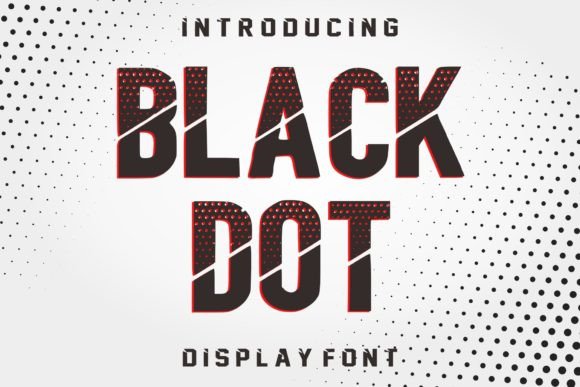
- Match the Message: Consider whether the tone of Black Dot aligns with your project. Its edgy and dynamic look suits themes of innovation, excitement, and modernity but may not fit traditional or minimalist aesthetics.
- Stay Consistent: If you decide to use Black Dot in multiple parts of a project, maintain consistency in size, spacing, and formatting to avoid visual clutter.
Organizing and Managing Font Usage for Long-Term Efficiency
- Categorize Fonts by Purpose: Create folders for display fonts, text fonts, script fonts, etc. Label Black Dot accordingly to streamline future selections.
- Use Naming Conventions: Name the font file something descriptive, like "Black_Dot_Display_Font," to avoid confusion with similar-looking typefaces.
- Backup Your Library: Store your font collection in cloud-based services or external drives to prevent data loss and ensure cross-device access.
- Check Licensing Terms: Before embedding or distributing designs using Black Dot, verify its usage rights. Some display fonts have restrictions that affect commercial applications.
Quality Control and Compatibility Considerations
Web Compatibility: If you plan to use Black Dot on a website, check if it’s available in web-friendly formats like WOFF or TTF. You may need to convert or embed it via CSS for proper rendering across browsers.
Print Readiness: For printed materials, confirm that the font is embedded in the PDF or compatible with the printer’s system. Avoid using it in small sizes where clarity becomes an issue.
Accessibility: Although display fonts are not always designed with accessibility in mind, ensure that any text using Black Dot is sufficiently readable. High contrast and sufficient size are key considerations here.
Enhancing Creativity Without Compromising Professionalism
Entrepreneurs and marketers can use it in presentations or pitch decks to highlight key selling points. Educators can spice up lesson plans or training materials with engaging headers. Bloggers and publishers can create shareable quotes or infographics that stand out in crowded feeds.
The secret lies in restraint and intentionality. Let the font speak where it matters most, and let subtler choices handle the rest.
Long-Term Value of Including Black Dot in Your Toolkit
Over time, you’ll likely find new ways to use it across different mediums. From digital illustrations to packaging mockups, its adaptability makes it a valuable long-term investment. Just remember to update your knowledge of licensing and compatibility regularly to stay compliant and efficient.
Getting Started with Black Dot
Once you understand its strengths, incorporate it into your next project. Whether it’s a client deliverable or a personal passion project, the right typographic choice can significantly enhance the outcome.
Final Thoughts on Practical Integration
Black Dot is more than just a font—it’s a tool that can shape the emotional tone of your designs. By understanding its place in your workflow and using it thoughtfully, you can elevate your projects with confidence and creativity.
As you continue refining your design processes, keep an open mind toward how typography influences perception. With careful planning and execution, Black Dot can become a trusted element in your visual storytelling arsenal.