Kawat: A Display Font That Elevates Your Brand and Design Workflow
Choosing the right font for a project is more than just picking a style—it’s about aligning your visual identity with your message. Kawat, a wise, cool, and unique display font, stands out as an excellent choice for professionals who want to add character and clarity to their branding, marketing materials, or creative projects. Whether you're designing a logo, crafting social media content, or creating custom stationery, Kawat offers a balance of boldness and readability that makes it versatile in both digital and print formats.
What Is Kawat and Why It Matters in Design
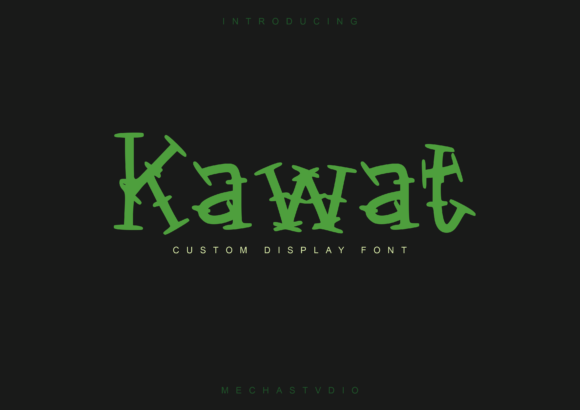
Kawat is a modern display font that blends geometric precision with organic curves. Its clean lines and slightly edgy aesthetic give it a contemporary feel while maintaining enough warmth to remain approachable. This duality makes Kawat ideal for use cases where you want to communicate professionalism without sacrificing personality.
In design, fonts serve as more than just text—they act as visual cues that influence how audiences perceive a brand or message. Kawat fits into this process by offering a unique voice that can differentiate your work from generic typefaces. It’s particularly useful in logos, headlines, posters, and other high-impact visuals where standing out matters most.
Before You Start: Preparing to Use Kawat Effectively
Before incorporating Kawat into your workflow, consider its role within your overall design strategy. Ask yourself:
- Does Kawat align with the tone and purpose of my project?
- Will it complement or contrast effectively with supporting typefaces?
- Is it legible at the sizes I plan to use it in?
These questions help ensure that Kawat isn’t just added for novelty but used intentionally. Once you’ve confirmed its suitability, download the font and install it on your system. Most modern design tools like Adobe Illustrator, Photoshop, Figma, and Canva support custom font integration, so be sure to verify compatibility across your preferred platforms.
During the Creative Process: Integrating Kawat Into Your Work
Kawat shines when used strategically throughout the design phase. Here are some practical ways to implement it during your creative workflow:
- Logo Design: Use Kawat as the primary or secondary font in your logo. Its distinctiveness helps create a memorable visual identity, especially when paired with minimalist layouts or strong color palettes.
- Poster and Banner Creation: Apply Kawat to headlines or key phrases to draw attention. Its structure allows for easy customization with effects like shadows, gradients, or outlines, making it adaptable to different themes and purposes.
- Stationery and Business Cards: Incorporate Kawat into your business cards, letterheads, or packaging for a professional yet artistic touch. Just be cautious not to overuse it; maintain a hierarchy by using it only for accents or titles.
- Social Media Content: Kawat works well for branded posts, infographics, or promotional banners. Its versatility ensures it looks great whether you're designing for Instagram, LinkedIn, or Facebook.
A common mistake designers make is applying a display font like Kawat too broadly. To avoid this, keep it reserved for short texts such as headers, taglines, or call-to-action buttons. This ensures that the font remains impactful rather than overwhelming.
After Implementation: Ensuring Consistency and Quality
Once you've integrated Kawat into your designs, consistency becomes crucial. Establish clear brand guidelines that define when and how to use the font. For example, specify if it should be used for all headlines or only specific ones, and determine which weights or styles (if available) are appropriate for each context.
Quality control is also important. Always test how Kawat appears across various devices and screen resolutions. While it may look sharp in your design software, scaling issues can sometimes affect its appearance in real-world applications. Consider exporting assets in multiple formats (like PNG for web and PDF for print) to preserve the font's integrity.
Working With Other Tools and Resources
Kawat doesn't operate in isolation. It interacts seamlessly with other elements of your design ecosystem. When pairing it with complementary fonts, choose something simpler for body text—like a sans-serif or serif font—to maintain readability. For instance, combining Kawat with Helvetica Neue or Georgia can create a balanced typographic layout.
Additionally, Kawat works well with vector illustration tools. If you're using Adobe Illustrator or Procreate, layering icons or illustrations around Kawat text can enhance its impact. The font’s structured form makes it a great base for adding hand-drawn textures or subtle animations in digital presentations or websites.
When working in collaborative environments, share font files securely with your team using cloud-based tools like Google Fonts or private font-sharing platforms. This ensures everyone has access to the same asset and maintains consistency across all deliverables.
Workflow Examples Where Kawat Adds Value
Here are a few real-world workflows where Kawat can streamline your creative process and improve outcomes:
- Branding Campaigns: Use Kawat for logo mockups and then carry it through to website headers, email signatures, and product packaging to reinforce brand recognition.
- Event Promotion: Incorporate Kawat into event posters, flyers, and invitations. Its modern look helps convey a sense of innovation or exclusivity, depending on your theme.
- Product Launches: Add Kawat to promotional materials such as landing pages, press releases, and social media teasers. Its bold presence can help capture attention and set the tone for your campaign.
- Editorial Design: Apply Kawat to magazine covers, blog headers, or article pull quotes. It adds flair without being distracting, making it perfect for editorial contexts where typography plays a central role.
By embedding Kawat into these stages of the creative process, you build a cohesive visual language that strengthens your message and engages your audience more effectively.
Practical Tips for Using Kawat in Everyday Projects
Here are some actionable tips to get the most out of Kawat in your daily design tasks:
- Use Proper Kerning: Because display fonts often have unique spacing, manually adjusting the kerning between letters can greatly enhance legibility and aesthetics.
- Limit Color Usage: Kawat looks best in one or two colors. Overloading it with gradients or too many hues can diminish its impact.
- Test Different Weights: If multiple weights are available (bold, light, etc.), experiment with them to find the right balance for your composition.
- Pair With Visual Elements: Enhance Kawat by adding subtle background textures or shapes. Since it’s a display font, it can hold up against bolder design elements without losing its clarity.
- Stay Organized: Keep your font library tidy. Assign Kawat to a specific folder or category so it's easily accessible when needed.
For those managing long-term projects or brands, maintaining a consistent use of Kawat across all platforms is essential. Create templates with predefined styles to save time and reduce errors. This approach supports efficiency and ensures your brand remains visually aligned, even as new team members join or new campaigns launch.
How Kawat Fits Into Broader Planning and Execution
In any planning process, typography is often overlooked until the final stages. However, integrating a font like Kawat early on can shape the direction of your design decisions. During initial brainstorming sessions, consider how the font contributes to the overall mood and message of your project. Does it evoke confidence? Creativity? Simplicity? Letting these answers guide your choices leads to more intentional and effective design execution.
During the implementation phase, Kawat can be a valuable asset in streamlining your workflow. Its clean structure reduces the need for heavy adjustments, allowing you to focus on layout, alignment, and color theory. This is especially helpful for freelancers or small teams with tight deadlines.
Post-launch, monitoring how Kawat performs in different environments is important. Gather feedback from users or stakeholders to see if the font enhances the experience or if it might need tweaking. Remember, even the best fonts can become problematic if they don’t perform well under certain conditions.
Long-Term Use and Adaptability
As your projects evolve, so will your needs. Kawat is designed to adapt to these changes. Whether you’re launching a new line of products or rebranding an existing company, the font’s flexibility allows it to fit naturally into updated designs. Maintaining a font like Kawat in your library ensures continuity and familiarity, which are vital for building trust with your audience.
For educators or bloggers, Kawat can also play a role in content creation. Use it in presentation slides, video intros, or downloadable guides to give your material a polished, professional edge. The font’s uniqueness helps reinforce your personal brand or course identity, making your content more memorable.
To future-proof your use of Kawat, store it in a secure, organized location. Cloud storage solutions like Dropbox or Google Drive are great options for keeping font files backed up and accessible. Also, stay informed about licensing terms, especially if you're using it in commercial settings. Knowing these details ahead of time prevents legal hiccups down the road.
Observations and Best Practices
Over time, users tend to develop a relationship with fonts they use regularly. Kawat, with its balanced design and ease of use, often becomes a favorite due to its ability to deliver impact without overcomplicating the layout. Observing how others apply it can provide inspiration and insight into new use cases.
One thing to note is that while Kawat is a display font, it still benefits from thoughtful placement. Avoid using it in small body text or situations requiring extended reading. Instead, let it shine in short bursts of information where it can command attention and spark interest.
Another observation is that Kawat pairs exceptionally well with monochromatic color schemes. The font’s structure and weight allow it to stand out without clashing, which is particularly useful in minimalist or modern design trends.
Conclusion
Kawat is more than just a stylish font—it’s a strategic tool that can elevate your branding, simplify your workflow, and enhance your visual storytelling. By understanding where and how to use it effectively, you can ensure that every design decision reinforces your message and resonates with your audience. From logo creation to poster design, Kawat offers a unique blend of form and function that makes it a reliable addition to any designer’s toolkit.
Whether you're a marketer looking to refresh your campaign visuals, a freelancer aiming to stand out in client proposals, or a small business owner building your first brand identity, Kawat provides the clarity and creativity needed to succeed. Add it to your fonts library today and discover how it can transform your next project—from concept to completion.