Patchy: The Quirky Display Font That Adds Personality
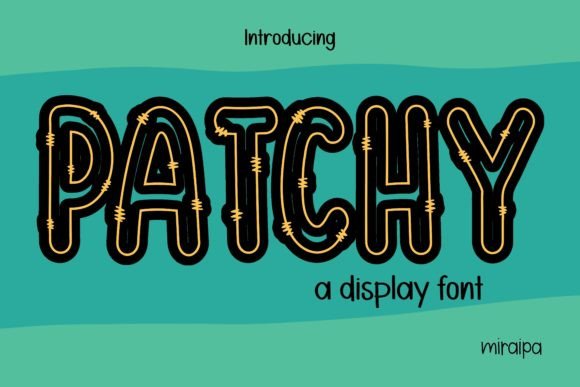
Patchy is a display font that stands out with its unique, handcrafted charm. Designed to bring character and visual interest to any design project, it blends whimsy with professionalism in a way that feels both modern and nostalgic. Whether you're crafting marketing materials, designing a website, or adding flair to personal projects, Patchy can help elevate your message and make it more memorable.
What Makes Patchy Special?
At first glance, Patchy appears playful yet versatile. Its quirky structure gives it an almost artisanal feel, as if each letter was carefully shaped by hand. This makes it ideal for creative applications where a touch of personality is needed without sacrificing legibility. While not suited for body text due to its decorative nature, Patchy excels when used for headlines, logos, titles, and other prominent text elements.
Key Characteristics of Patchy
- High Contrast: The thick and thin strokes create a dynamic look that commands attention.
- Irregular Shapes: Each letter has subtle imperfections, mimicking handwritten styles but with precision.
- Unique Style: It’s neither too bold nor too delicate, striking a balance between fun and sophistication.
- Excellent for Branding: Its distinct appearance helps businesses stand out visually.
Who Should Consider Using Patchy?
If you’re someone who values creativity and wants your designs to reflect individuality, Patchy might be the perfect fit. Freelancers, small business owners, bloggers, educators, and marketers will find this font especially useful in branding efforts, promotional content, and digital assets like social media graphics and banners.
For example, a boutique clothing store could use Patchy on their storefront sign to convey a sense of charm and authenticity. A lifestyle blogger might incorporate it into headers or Instagram posts to add a personal, artistic touch. Even educators can use it creatively in presentations or classroom posters to engage students with a more dynamic visual style.
Beginner-Friendly Use Cases
- Logo Design: Start by using Patchy in a logo mockup for a new brand or personal project. Try pairing it with a minimalist sans-serif font for contrast.
- Social Media Graphics: Create eye-catching Facebook covers, Twitter headers, or Pinterest pins using Patchy as the headline font.
- Event Posters: Apply it to event names, festival promotions, or community announcements for a lively aesthetic.
- Print Materials: Use it in print for invitations, menus, or packaging where visual appeal is key.
Why Choose Patchy Over Other Fonts?
Many display fonts lean heavily toward one extreme—either too serious or too playful. Patchy finds a happy medium, offering enough quirkiness to catch the eye while still maintaining a level of elegance. It’s particularly effective when trying to communicate warmth, creativity, or a handmade vibe in professional settings.
Compared to generic fonts like Arial or Times New Roman, Patchy adds depth and emotional resonance to your text. In today’s competitive design landscape, standing out matters. With Patchy, your content doesn’t just get read—it gets noticed.
Where Can You Use Patchy?
Patchy is most commonly used in digital and print environments where a display font can shine. Here are some practical scenarios:
- Websites: Use it for headings, hero sections, or call-to-action buttons to add a unique visual element.
- Mobile Apps: Incorporate it into app interfaces for titles or section headers to enhance user experience.
- Email Marketing: Add a bit of flair to subject lines or promotional banners within email campaigns.
- Merchandise: Apply it to t-shirts, mugs, or stickers for a casual, approachable brand image.
Practical Tips for Using Patchy
When working with Patchy, it’s important to consider how it interacts with other design elements. Because of its distinctive style, it often needs space around it to breathe. Avoid overcrowding the text with too many effects or colors that may distract from its natural beauty.
Also, keep the background simple. A clean white or light-colored backdrop tends to highlight the font’s details best. For darker themes, ensure there's sufficient contrast so the text remains readable and impactful.
Pairing Patchy with Other Fonts
To maintain readability while keeping the design interesting, pair Patchy with complementary fonts. A good rule of thumb is to match it with a neutral, easy-to-read font like Lato, Open Sans, or Montserrat for supporting text. This allows Patchy to take center stage while ensuring the rest of your content remains accessible.
Things to Consider Before Choosing Patchy
While Patchy is incredibly versatile, it’s not a universal solution. Here are some considerations to keep in mind before deciding to use it:
- Legibility: Since it’s a display font, it works best in larger sizes and limited contexts. Don't overuse it in long paragraphs.
- Brand Tone: Make sure its quirky style aligns with your brand identity. It may not suit all industries equally.
- Accessibility: Always test how well it displays across different devices and screen resolutions.
- License Type: Ensure you understand the usage rights, especially if planning to use it in commercial projects.
Real-World Inspiration
Looking at real-world examples can help clarify how Patchy fits into various contexts. Imagine a bakery’s website using Patchy for the shop name and menu titles. The font would evoke a cozy, homemade atmosphere that perfectly complements the product. Or picture a tech startup using it sparingly in a landing page for a tagline or feature highlights—adding just the right amount of personality without overwhelming the user interface.
Getting Started with Patchy
If you're new to typography or looking to expand your design toolkit, here’s how to begin using Patchy effectively:
- Download or access the font through a trusted platform like Adobe Fonts or Google Fonts.
- Install it on your system or import it into your design software (e.g., Photoshop, Illustrator, Figma).
- Create a few sample layouts to see how it looks in different sizes and weights.
- Test it on multiple screens and backgrounds to ensure it reads clearly and consistently.
- Use it in moderation to maintain a balanced and readable design.
Design Tools That Support Patchy
Most major design platforms support custom fonts, making it easy to integrate Patchy into your workflow. Popular tools include:
Final Thoughts on Patchy
Fonts shape how we perceive information, and choosing the right one can make all the difference. Patchy isn’t just another decorative typeface—it’s a tool that can help you express your brand’s voice or add a dash of originality to your next project. By understanding when and where to apply it, you can unlock its full potential and create designs that resonate with your audience.
Whether you're a seasoned designer or just starting out, experimenting with Patchy can lead to fresh, engaging visuals. Just remember to use it thoughtfully and always prioritize clarity alongside creativity. With these tips in mind, you're ready to explore what Patchy can do for your work.