Straal: A Bold and Authentic Display Font for Modern Branding
Understanding the Role of Straal in Design Projects
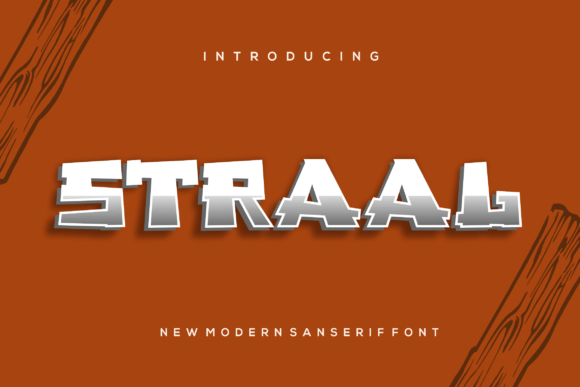
Straal is a modern display font that stands out with its bold, clean lines and authentic character. Designed to capture attention and convey confidence, it is ideal for branding projects where visual impact matters most. Whether you're creating a logo, designing merchandise like T-shirts, or building a unique identity for an esports team, Straal can be a powerful asset in your typography toolkit.
This typeface isn't just about aesthetics; it plays a strategic role in the broader design process. Choosing the right font can influence how your brand is perceived—Straal brings a sense of strength and clarity to any project. It’s not typically used for body text due to its high contrast and stylized features, but rather as a headline or accent font to highlight key messages and establish a strong visual hierarchy.
Before Project Launch: Establishing Brand Identity
In the early stages of a branding project, selecting a font like Straal helps define the tone and personality of your brand. Its bold nature makes it excellent for logos, taglines, and other identity elements that need to make a lasting impression. Before finalizing your project, consider how Straal aligns with your brand's values—does it feel modern, confident, and approachable?
Use cases during this phase might include:
- Brainstorming font pairings with complementary sans-serif or serif fonts for secondary text.
- Testing the font in different color schemes and backgrounds to ensure visibility and impact.
- Creating mood boards or style guides that showcase how Straal will appear across various platforms and materials.
During Design Execution: Enhancing Visual Communication
Once you've decided to use Straal, integrate it into your design workflow at the appropriate stage. For digital designers working on websites, social media assets, or promotional materials, adding this font early in the layout process ensures consistency and alignment with the overall visual strategy.
Designers using tools like Adobe Illustrator, Photoshop, or Figma should install Straal in their system and import it into their design software for seamless use. Here are some practical tips for implementation:
- Install the font: Download and install Straal on your computer before opening your design tool.
- Set up font layers: In your design file, create separate layers for text elements using Straal so they’re easy to adjust later.
- Test readability: Ensure that even though Straal is bold, it remains legible at smaller sizes if needed for specific applications like app icons or badges.
After Finalization: Maintaining Consistency Across Channels
Post-project, the real test begins—how well does Straal hold up when applied across multiple platforms? Once your logo or branding materials are complete, use the font consistently in all related content. This includes business cards, packaging, banners, and online profiles. Consistency strengthens brand recognition and ensures a cohesive look.
For web developers and marketers, embedding Straal into websites requires either linking to it via Google Fonts or uploading it through a custom font service like Typekit or Webflow. Always check for proper licensing and compatibility with your site’s CMS or platform.
Integrating Straal with Other Tools and Resources
Straal works best when paired with thoughtful planning and execution. Here’s how it fits into common workflows:
Pairing with Supporting Fonts
A great design doesn’t rely on one font alone. Pair Straal with more subdued, readable fonts for supporting text. For example, use a clean sans-serif like Montserrat or Lato for body copy alongside Straal for headlines. This combination maintains visual interest while ensuring usability and accessibility.
Collaboration and Handoff Processes
If you're part of a collaborative team, such as a marketing department or creative agency, ensure that everyone involved understands how and where to apply Straal. Share the font files with colleagues who may need them for print or web assets, and document its usage in shared brand guidelines. This prevents inconsistencies and streamlines the handoff from designer to developer or printer.
Using with Templates and Assets
Many design templates, especially those for logos, T-shirt prints, or social media graphics, already include placeholder fonts. Replacing these with Straal can elevate the overall design instantly. When using pre-made templates, always verify that the font weight and spacing match the intended outcome. Adjust kerning manually if necessary to maintain balance and harmony.
Logo Design
When designing a logo, start by sketching concepts that reflect your brand’s message. Once you settle on a direction, bring in Straal to add weight and authority to the name or slogan. Test variations in uppercase and lowercase forms, and experiment with different stroke widths to see what best matches your brand’s energy.
Example workflow:
- Sketch initial logo ideas using pen and paper or digital drawing tools.
- Digitize the concept in vector-based software like Illustrator.
- Add the Straal font to the text element and adjust alignment and spacing.
- Export the logo in multiple formats (PNG, SVG, JPEG) for both print and digital use.
T-Shirt Printing
For merchandising like T-shirt printing, choose a design style that highlights the boldness of Straal. Since fabric printing often involves screen-printed or embroidered text, ensure the font has enough thickness to remain clear after production. Avoid overcomplicating the design—let the font do the talking.
Implementation steps could include:
- Decide on the placement of the text (chest, back, sleeve).
- Select the appropriate size and orientation for maximum visibility.
- Use a high-contrast color for the font against the shirt background.
- Send the final artwork to the printer, confirming font compatibility and file format requirements.
Esports Branding
In the fast-paced world of esports, first impressions are everything. Straal’s dynamic appearance makes it a natural fit for team names, sponsorships, and tournament titles. It adds a layer of professionalism and intensity that resonates with gamers and fans alike.
To implement effectively:
- Create a primary and secondary version of the font for different use cases (e.g., full name vs. abbreviation).
- Ensure the font works well in motion graphics, such as intro videos or live event displays.
- Consider how it looks in low-resolution environments like mobile screens or LED boards.
- Include it in official team merchandise, website headers, and social media avatars.
Preparation and Compatibility
Before incorporating Straal into your project, assess compatibility across devices and platforms. Some operating systems may not render certain characters correctly unless the font is properly installed. Always keep a backup font ready in case of technical issues.
Additionally, confirm whether you have the correct license for commercial use. While many free fonts offer limited permissions, professional-grade fonts like Straal often require purchase for extended rights. This step is critical for businesses and entrepreneurs looking to avoid legal pitfalls down the line.
Usability and Organization
Even the boldest fonts can become problematic if not organized within a design system. Create naming conventions for font styles (e.g., "Straal - Headline", "Straal - Accent") to help streamline your work and improve collaboration efficiency. This becomes especially important in large-scale projects with multiple contributors.
Efficiency and Long-Term Use
Using a font like Straal efficiently means knowing when to apply it and when to let subtler fonts take over. Overuse can lead to visual fatigue or dilute the message you want to convey. Reserve it for key focal points—logos, banners, headlines—and use it sparingly in supporting content.
Long-term use also requires monitoring trends and user feedback. While bold fonts remain popular, staying adaptable ensures your brand doesn’t feel outdated in the future. Regularly revisit your design choices and update visuals as needed to maintain relevance and freshness.
Marketing and Advertising
Marketers often turn to display fonts like Straal for ad campaigns, posters, and billboards. The font’s ability to command attention makes it perfect for short, punchy slogans or product names. However, it’s important to balance boldness with clarity—especially in print advertising where legibility from a distance is crucial.
Bloggers and Content Creators
Blogger templates and YouTube thumbnails benefit from strong typography. Straal can be used for channel titles, video headings, or blog post titles to give content a polished and modern edge. Just remember to pair it with simpler fonts for subtitles or descriptions to maintain a balanced composition.
Freelancers and Small Businesses
Freelancers and small business owners may find Straal particularly useful for portfolios, signage, and branded materials. Its versatility allows it to work across both digital and physical formats. As a freelancer, consider including it in your personal brand toolkit to stand out in client proposals or social media posts.
Quality Control and Best Practices
Regardless of your industry, maintaining quality control is essential when using any font. With Straal, this means checking how it appears in different contexts—such as dark mode interfaces, high-contrast environments, or printed on glossy versus matte surfaces. Conducting these tests early can save time and prevent last-minute revisions.
Also, consider the emotional response the font evokes. Does it feel aggressive, calm, playful, or serious? Aligning the font with the desired brand emotion is a subtle but powerful aspect of typography selection.
Some Best Practices Include:
- Always proofread designs using Straal—its bold style can sometimes hide typos or misaligned characters.
- Keep font weights consistent (e.g., don’t mix bold and regular versions without purpose).
- Limit the number of fonts used in a single project to maintain a cohesive aesthetic.
- Store font files in a centralized library or cloud folder for easy access and version control.
Final Thoughts on Typography Strategy
Typography is more than just choosing a pretty font—it’s about communication, usability, and brand integrity. Straal, with its bold and authentic look, offers a compelling option for designers aiming to create strong visual identities. By understanding its strengths and limitations, and integrating it thoughtfully into your workflow, you can enhance your projects’ impact without compromising clarity or functionality.
Whether you're launching a new brand, redesigning a website, or preparing for an esports event, Straal can be the defining element that elevates your design. Add it to your fonts library today, and discover how it can become an instant favorite in your creative arsenal.